Real-time Target Identification
Shows block and entity names instantly as you look at them. Built with client-side raycasting for zero server dependency.
That's What I'm Looking At
A client-side block and entity identification overlay mod for the Tapestry platform.
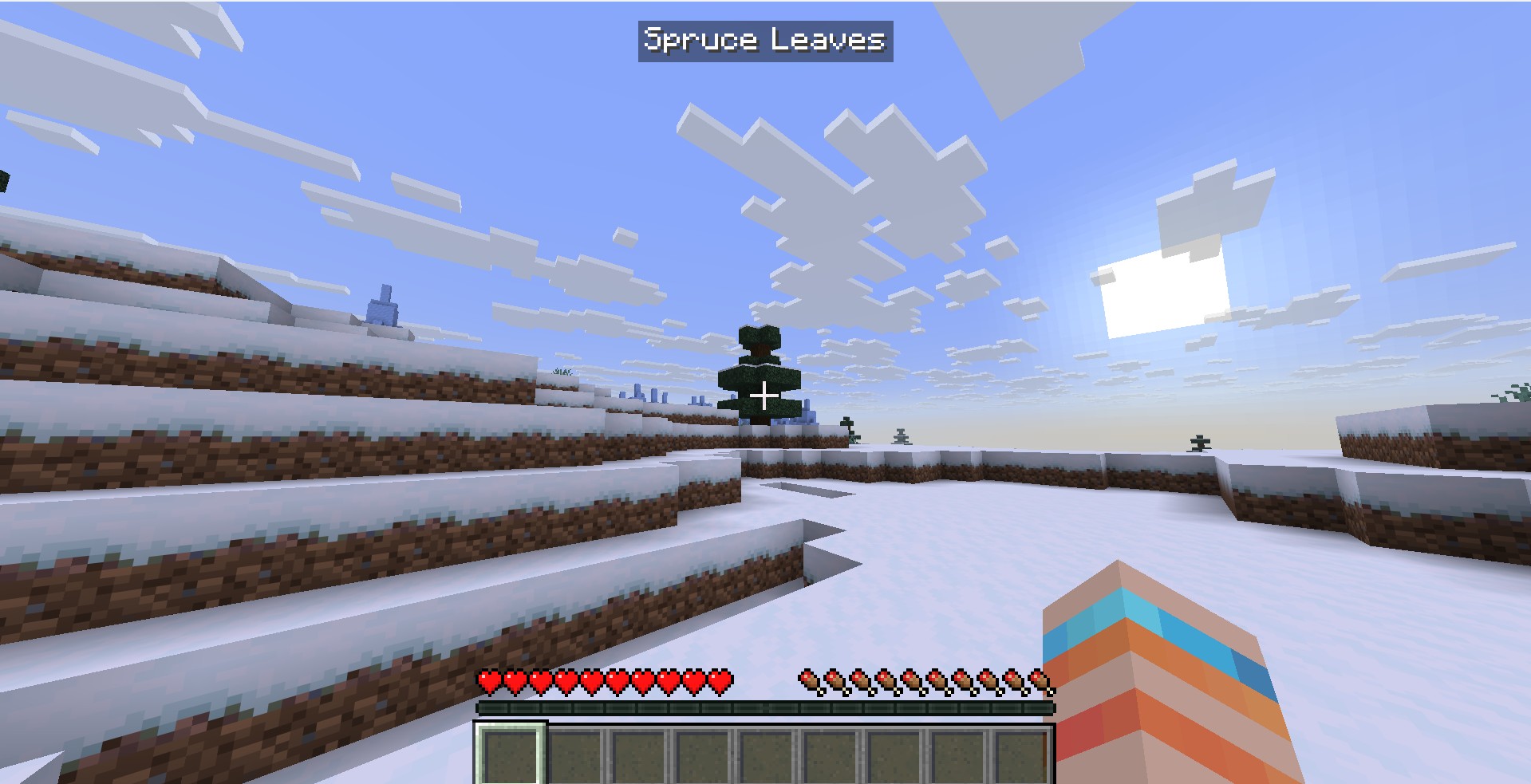
TWILA provides real-time identification of blocks and entities under your reticle using client-side raycasting. Built entirely on Tapestry's TypeScript-first modding framework with safe API boundaries and explicit lifecycle management.
Shows block and entity names instantly as you look at them
Detects both blocks and entities with position tracking
Zero server dependency, works in single-player and multiplayer
Game tick-based raycasting with smart miss tracking
Minimal text overlay at top-center of screen
Comprehensive diagnostics and graceful degradation
Enhanced logging and test overlays for troubleshooting
TWILA leverages Tapestry's core capabilities:
activate/deactivate hooks with deferred initializationtapestry.client.players.raycastBlock() and tapestry.client.overlaytapestry.scheduler.nextTick()TWILA uses a deferred initialization pattern:
tapestry.mod.define() registers the mod with Tapestryactivate() function called by Tapestry, exposes global registration functiontwilaRegisterEvents() when client APIs are availableThis approach ensures all Tapestry APIs are fully available before TWILA attempts to use them.
tapestry-*.jar and twila-*.jar in mods/# Copy built JARs to Minecraft mods folder
cp twila/build/libs/twila-*.jar ~/.minecraft/mods/Note: This only installs TWILA. You'll also need to build and install the Tapestry platform separately.
TWILA uses an internal state machine for robust lifecycle management:
enum TwilaState {
  INITIALIZING = "INITIALIZING",  // Mod loading, APIs not ready
  RUNNING = "RUNNING",              // Active raycasting and overlay
  DISABLED = "DISABLED"             // Fatal error or deactivated
}const result = tapestry.client.players.raycastBlock({
maxDistance: 32.0,
includeFluids: true
});
if (result.hit) {
// Block detection
if (result.blockName) {
console.log(`Block: ${result.blockName} (${result.blockId})`);
console.log(`Position: ${JSON.stringify(result.blockPos)}`);
}
// Entity detection
if (result.entityName) {
console.log(`Entity: ${result.entityName} (${result.entityId})`);
console.log(`Position: ${JSON.stringify(result.entityPos)}`);
}
}TWILA uses a simple object-based overlay definition:
const overlay = {
  id: "twila-overlay",
  anchor: "TOP_CENTER",
  zIndex: 10,
  visible: true,
  render: function(ctx) {
    if (currentTarget) {
      return {
        type: "text",
        content: currentTarget.blockName,
        x: 0,
        y: 8,
        color: "#FFFFFF"
      };
    }
    return null;
  }
};

tapestry.client.overlay.register(overlay);function raycastLoop() {
if (twilaState !== TwilaState.RUNNING) return;
// Perform raycast
const result = tapestry.client.players.raycastBlock({
maxDistance: 32.0,
includeFluids: true
});
// Process result
if (result.hit) {
currentTarget = {
blockName: result.blockName || result.entityName,
blockId: result.blockId || result.entityId,
targetType: result.entityId ? "entity" : "block",
position: result.blockPos || result.entityPos
};
}
// Schedule next tick
tapestry.scheduler.nextTick(raycastLoop);
}TWILA implements consecutive miss tracking to prevent flickering:
const MISS_CLEAR_THRESHOLD = 4;
let consecutiveMisses = 0;

if (!result.hit) {
  consecutiveMisses++;
  if (consecutiveMisses >= MISS_CLEAR_THRESHOLD) {
    currentTarget = null;  // Clear after 4 consecutive misses
  }
} else {
  consecutiveMisses = 0;  // Reset on hit
}TWILA currently uses hardcoded configuration values:
For development, you can modify these flags in src/index.ts:
const DEBUG_DISABLE_RAYCAST = false;  // Disable raycasting system
const DEBUG_DISABLE_OVERLAY = false;  // Disable overlay system
Future versions may include runtime configuration options.
scheduler.nextTick()Mod Not Loading
[TWILA] Starting activation... in consoleNo Overlay Displayed
[TWILA] Overlay registration successful in logs[TWILA] All systems initialized successfullytwilaState is RUNNINGAPIs Not Available
[TWILA] Global registration function called in logstwilaRegisterEvents() is being calledBuild Failures
npm install -g typescript./gradlew clean buildtsc --versiondist/ directory is created after tscTWILA logs comprehensive diagnostics to console:
Startup:
[TWILA] Starting activation... - Mod initialization begins[TWILA] === TWILA ENVIRONMENT === - API availability check[TWILA] Global registration function called - APIs ready[TWILA] All systems initialized successfully - Ready to runRuntime:
[TWILA] === RAYCAST LOOP ENTRY === - Each tick (if verbose logging enabled)[TWILA] Raycast result: {...} - Hit/miss detection[TWILA] Target updated: {...} - New target acquiredErrors:
[TWILA:FATAL] - Critical error, mod disabled[TWILA] Error details: - Full error context with stack traceCheck current state in logs:
twilaState: INITIALIZING - Still loadingtwilaState: RUNNING - Operating normallytwilaState: DISABLED - Fatal error occurredtsc) recommended# Install dependencies (if using local npm)
npm install
# Build TypeScript (using global tsc)
tsc --project ./tsconfig.json
# Build JAR (includes TypeScript output)
./gradlew build
# Quick build (Windows)
./build-twila.bat
# Quick build (Linux/Mac)
chmod +x ./build-twila.sh && ./build-twila.sh
# Debug build with enhanced logging (Windows)
./build-debug.bat
# Debug build with enhanced logging (Linux/Mac)
chmod +x ./build-debug.sh && ./build-debug.sh
# Basic build without extras (Windows)
./build-basic.batFor troubleshooting mod loading and runtime issues, use debug builds which provide:
twila-1.0.0.jartwila-1.0.0-debug.jarDebug logs appear in Minecraft console with [TWILA] prefix. Look for startup diagnostics showing API availability and system initialization status.
fatal()AGPL-3.0 License - see LICENSE file for details.